And the receipt book says otherwise. Every dispute costs you time, money or a family's trust.
Complete School Management Software
For school owners Proprietors and head teachers in Ghana
Know who has paid. Collect what is owed.
Tallio is school software for owners who want every cedi accounted for. See what each class owes, remind every family that owes with one SMS, print a whole class's report cards in an afternoon, and see how your JHS 3 class is likely to do at the BECE while there is still time to help.
- Pre-Nursery to JHS 3
- Works without internet
- Your old records come with you
- Installed at your school by our team
- One price per 4-month term
Sound familiar?
Running a school shouldn't mean guessing.
By then the money is harder to collect, and some of it never comes.
And nobody can say where the difference went.
While a few late score sheets hold up the whole class.
Too late to help the pupils who were a mark or two short.
So you can't see who changed what, or when.
Tallio answers all six, from one place.
See how
The fix
More fees in. Better results out. Nothing hidden.
Collect more of what you are owed
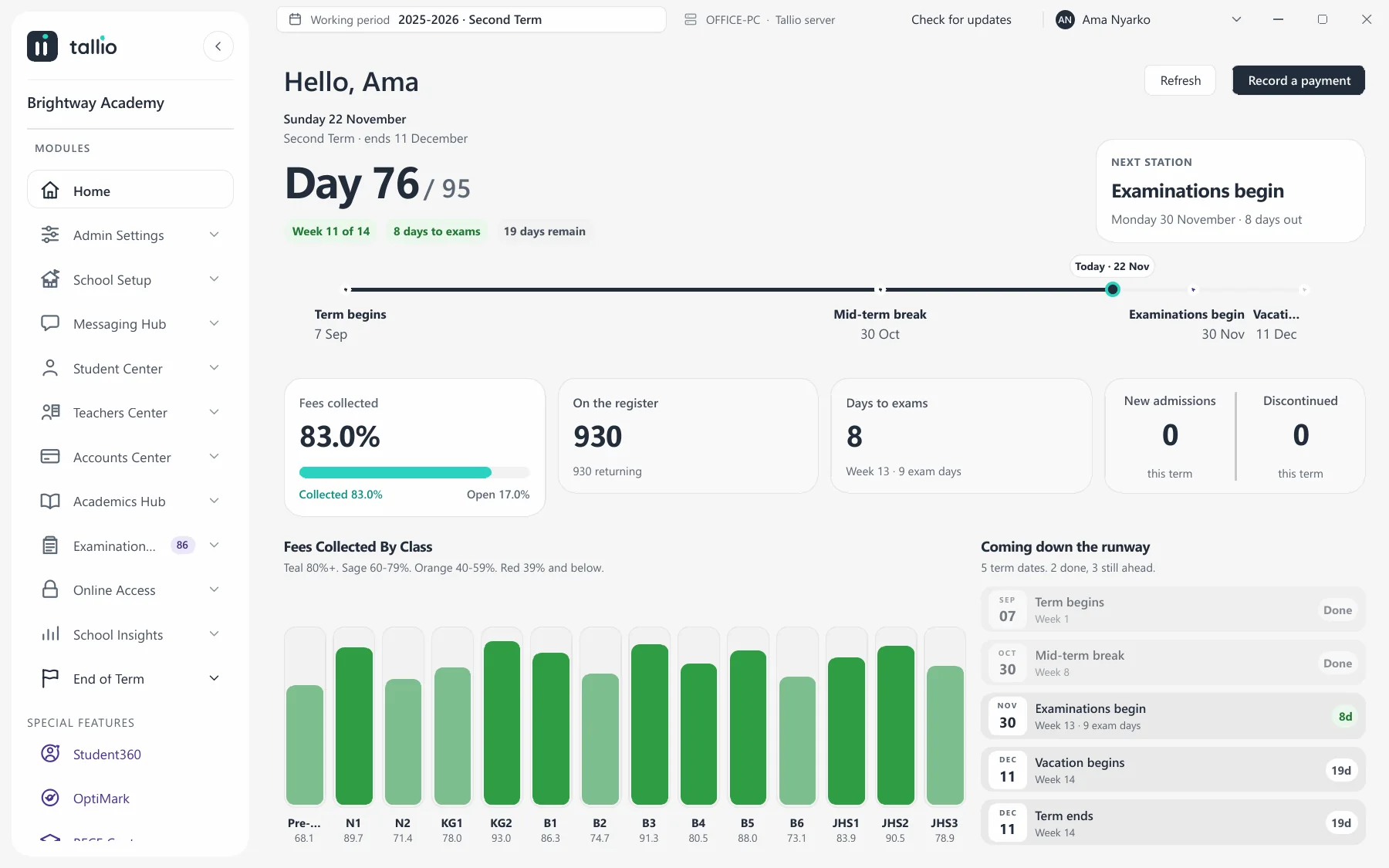
See every class's collection rate on one screen, and remind every family that owes with one SMS.
- Balances worked out, never typed
- Reminders on a schedule, and promises to pay kept track of
- Financial statements every term, with a PDF
Results parents talk about
Report cards that make your school look its best, and a BECE forecast that tells teachers where to focus.
- A whole class's report cards in one run
- Pupils a mark or two from a better grade
- Report cards sent to parents by SMS
Control, without being in every room
Every change is logged with who did it and when. Staff see only what their role allows.
- Live view of which teachers have submitted
- Staff attendance by PIN at the door
- Nothing deleted, every correction traced
Built inside a real school
One system for the whole school.
Tallio was built alongside a working basic school in Ghana, with its bursar, teachers and head, and it runs that school's fees and records every day. Every screen below is real Tallio, filled with an invented school so no family's details are shown.
For the bursar and the proprietor
Take fees in four steps.
Find the pupil, review the account, pay now, print or text the receipt.
- Balance by fee type, so School Fees and levies never mix.
- Discounts for staff children and siblings, applied the same way every term.
- Overpayments kept as credit for the next bill.
For the proprietor
Know where the money stands, term by term.
Financial Statements show what the school billed, collected and is still owed, for this term, the year to date or any term before, with a PDF to keep. A short brief reaches your phone every week.
- From what was owed at the start to what is owed at the end, step by step.
- Against the same terms a year earlier, so you see which way the school is going.
- A weekly owner brief by text, with a one-page PDF.
For the head teacher
See who has submitted marks, live.
Teachers enter marks on their phones. You watch every class fill up, then print report cards for a whole class at once.
- Not started to released, by class, teacher and subject.
- Chase the right teacher before report day, not after.
- Export the whole picture to Excel in one click.
For the JHS team
Know your BECE class before the exam does.
The BECE Center projects each pupil's aggregate subject by subject from the mocks you choose, with a model fitted on real BECE results, then shows who needs help first.
- A briefing on the class against your target after every mock.
- Follow-up: pupils flagged, only just inside the target, or getting worse.
- Core subjects and electives, weakest first, with broadsheets to print.
For class teachers
Every pupil, every term, at a glance.
Student360 sorts a class by who needs attention, then opens any pupil's standing, subjects, attendance and conduct.
- Alerts first, so no struggling pupil is missed.
- Answers for parents' day, with every term in one table.
- Class spread and subjects weakest first.
For the head teacher
Your staff, their load and their attendance.
The staff register shows who teaches what and how many classes each carries. Attendance is taken by PIN on a tablet at the door.
- Teaching load for every member of staff.
- Clock-in by PIN, recorded to the minute.
- Homework approved by the office before parents see it.
For exams and the staff room
Mark objective papers with a scanner.
Print one answer sheet, scan the stack or photograph the sheets, and OptiMark marks every paper and sends the scores to the score sheets.
- One answer sheet for the whole school, printed from Tallio.
- Pages scanned upside down still read correctly.
- Hours of marking become minutes.
For the office
Reach every parent without paper.
Receipts, report cards and balance reminders go out by SMS from your school's name. When the internet drops, messages wait and send later.
- Delivered, waiting or failed for every message.
- Cost shown before sending.
- Report cards as a private link parents open on any phone.
For the front office
From enquiry to enrolment.
Record an enquiry, move it through pending admissions, and send an acceptance letter on your letterhead by SMS.
- Online applications from any phone on the school WiFi.
- Acceptance letters with your crest and signature.
- Promotions at year end, previewed before anyone moves.
Teacher & parent apps
Your school in every teacher's and parent's pocket.
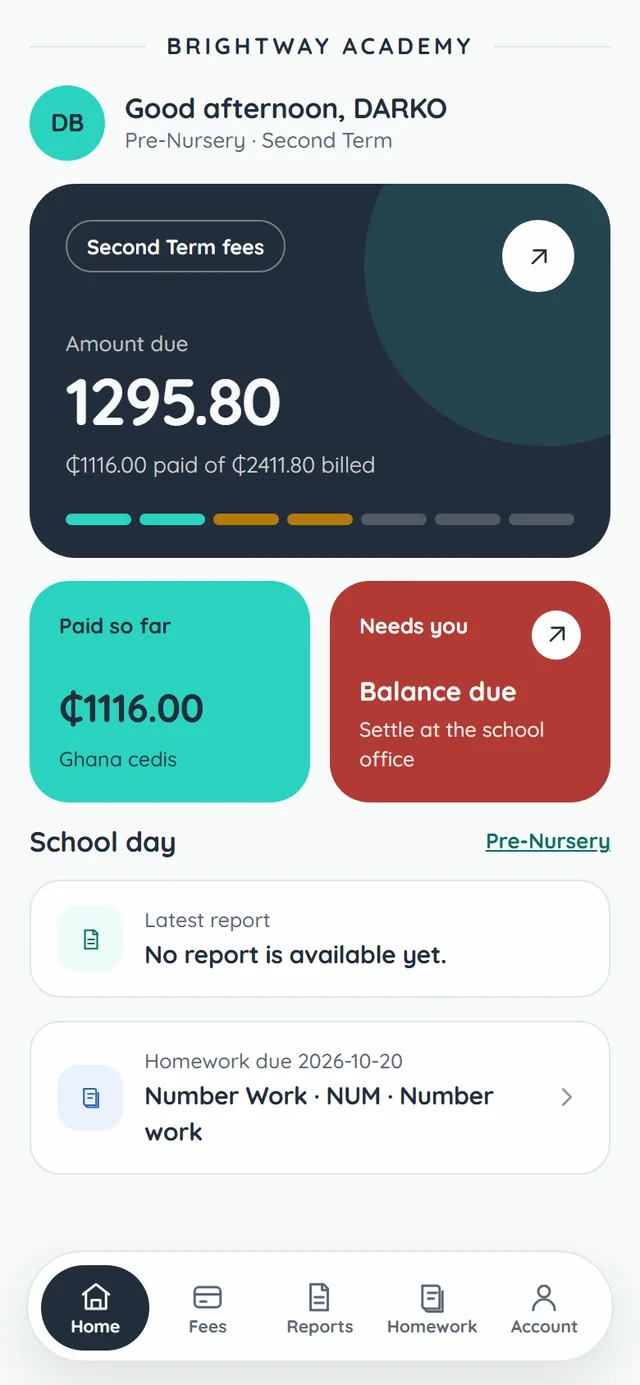
Two web apps that open on any phone, with no download. Teachers enter marks from home. Families check fees, report cards and homework.
Marks in on time, without the staff room queue.
Each teacher sees only their own classes and subjects, saves as they go, and submits when the sheet is complete. Class teachers take the daily register on the same phone.
- A keypad built for marks, one pupil at a time.
- Comments per pupil when the exam asks for them.
- Homework filed from the phone, approved by the office.
Fewer calls to the office. Happier parents.
Families see what is owed, what has been paid and what homework is due, in their own time, on their own phone.
- Fees: amount due, paid and billed, with every receipt.
- Report cards and school documents to open and keep as PDFs.
- Homework the school has approved, with due dates.
Report cards
Report cards that sell your school.
Choose from 12+ report card layouts, each printed with your crest and signatures: five for Nursery and KG, four for Basic 1 to 6 and four for JHS. Here are three of them. Pick one to read a real sample.
Also in Tallio: Bright Days, Learning Journal and Launchpad for Nursery and KG; Meridian and Compass for Basic; Detailed 3-Page, Compact and the BECE Mock Brief for JHS; a plain black-and-white card for Pre-Nursery to Basic 6; and a Placement Outlook letter for JHS parents.
Bright and friendly, built for young children. Every learning area is a rung on the ladder, so parents see at a glance where their child is strong.
- Page 1 Every subject rated on the ladder
- Page 2 The rest of the term, habits and signatures
- Page 3 A plan to help the child at home
Sample report for an invented pupil at an invented school.
And the rest of the school
Every office job, in one place.
Cash Records
Every payment by day, cashier, method or class. Reconcile the cash box before you lock up.
Arrears Follow-Up
Who owes, how long it has been and what was promised. Reminders go out on a schedule, and instalment plans flag a missed payment.
Report Cards
Prepare, check and print a whole class, then send to parents by SMS.
Works offline
Tallio runs on a PC in your school. No internet bill keeps it running.
0 MBof internet needed to take fees or print
Class lists
Every class with the columns you choose, to Excel or print.
Exam sittings
End of Term, Mocks and Class Tests, filed per class.
Discounts
Staff children and siblings, on one item or the whole bill, credited the same way every term.
Students
The full register with class, status and every record, searchable in seconds.
Receipts that check out
Every receipt carries a code. Type it in and the payment comes up.
K7QM-3RT-9WDexample check code
Built for owners
Your records stay in your school, and they add up.
Every role, its own access
A cashier takes fees without seeing marks. A teacher enters marks without seeing fees.
Nothing quietly changed
Balances are worked out from bills and payments. Mistakes are reversed, never deleted.
Backups that restore
Daily copies to USB and Google Drive, OneDrive or Dropbox, each one checked.
No internet needed
Everything runs on your school network. SMS waits and sends when the connection returns.
Every feature
120 features. One system.
Replace the exercise books, the Excel files and the separate SMS app with one place your whole school works from.
Fees & accounts
24- Pay now, print or text a receipt
- Balances by fee type, worked out
- Arrears follow-up: reminders and promises to pay
- Instalment plans, with missed payments flagged
- Daily cash by cashier
See all 24
- Receipts with a check code and amount in words
- Receipt check by code
- Overpayment kept as credit
- Unapplied payments applied in Payment Corrections
- Bills Setup: fee types, items, class and student bills
- Bill items carried from term to term
- Quick bill for one-off items
- Discounts on one item or the whole bill
- Sibling accounts
- Payment Corrections, nothing deleted
- Balances on any date
- Debts aged by days and by term
- Fee reminders by SMS on a schedule
- Collections by method, class or day
- Open any figure to see the pupils behind it
- Fees reports by class, to Excel and PDF
- Full student ledger
- Statements as a private link
- Trading accounts for school sales
Marks & report cards
14- Score sheets with drafts and release
- Live board of who has submitted
- 12+ report card layouts
- A whole class printed in one run
- Report cards sent by private link
See all 14
- Excel import of marks, checked first
- Printable score sheets and attendance sheets
- Exam sittings: End of Term, Mocks, Class Tests
- Subject comments from each teacher
- Report Card Setup: crest, letterhead, signatures, layout
- Grading scales for each class group
- Class summary and broadsheet for each sitting
- Print preview: pages, two-sided, colour and scale
- Sent only to pupils who have cleared their fees, after a test send
BECE Center
10- A briefing on the class against your target
- Pupils flagged, borderline or slipping
- Each pupil's aggregate, projected subject by subject
- Core subjects and electives, weakest first
- Broadsheets for the class
See all 10
- Projections from a model fitted on real BECE results
- Student360: who needs attention, and why
- Preparation towards the BECE: a study plan per core paper
- A brief after every mock
- Letters to parents
Marking by scanner
5- One answer sheet for the whole school
- Scan a stack, marks go to score sheets
- Photos of sheets read as well as scans
- Pages upside down still read
- OptiMark on its own for any class list
Teacher & parent apps
6- Teachers enter marks on their phones
- Teachers take the daily class register
- Comments and homework from the phone
- Parents see fees and every receipt
- Report cards, school documents and homework for families
- No download, any phone
Parents & SMS
13- Bulk SMS to a class or the school
- Delivered, waiting or failed for each
- Cost shown before sending
- Sent from your school's name
- Waits for the internet, then sends
See all 13
- Message Automations, birthday messages among them
- Absent pupils' parents texted from the register
- Wording templates
- SMS balance on screen
- Private links that expire
- When each parent first opened their link
- Contact Drive to confirm parents' numbers
- Internal Chat between staff
Students & admissions
11- Full student register and records
- Enquiry to enrolment in one page
- Acceptance letters by SMS
- Year-end promotions, previewed
- Online applications on school WiFi
See all 11
- Class lists to Excel or print
- Photos and guardians on every record
- Birthdays and guardian phones from a workbook
- Enquiry acknowledgement SMS
- Leavers kept, never deleted
- Careers: questionnaires and a Career Path report
Staff & term
12- Staff register with teaching load
- Staff attendance by PIN
- Homework approved by the office
- Close the Term in five steps
- Term calendar on the Home screen
See all 12
- Teachers Dashboard
- An Operations Manager role, one step below Administrator
- Accounts pack for the term
- Closing balances carried forward
- The next year set up when the last term closes
- Working period changes need a reason
- Next term's bills prepared early
School Insights, for the owner
6- Financial statements: this term, the year to date or any term before
- Every statement as a PDF
- A weekly owner brief by text
- Fee forecast against how the school usually collects
- Enrolment trends: admissions, retention and why pupils leave
- Teacher summary: attendance, homework and marks deadlines
Control, safety & setup
19- Roles with per-screen permissions
- Activity log of every change
- Daily backups to USB and the cloud
- Restore wizard on a new PC
- Runs without internet
- Installs from a USB stick
- Staff PCs find the server themselves
- Old records moved across
See all 19
- System Health: a text to the owner when something breaks
- Backups say whether a copy left the building
- Backup encryption, if you want it
- School details, crest and signatures
- Class setup with a removal preview
- Confirmation before anything destructive
- Daily integrity check
- Signed updates over the school network
- Excel and print from every list
- Sharp printing
- Adjustable interface size
Free fee check
What are unpaid fees costing your school?
Put in your own numbers. Nothing leaves this page unless you choose to send it.
Your school
unpaid at the end of each 4-month term
Over an academic year (3 terms)
Fees billed per term
Your Tallio licence, per term
Tallio doesn't collect fees for you. It shows who owes in every class, reminds every family on a schedule and keeps promises to pay in view, so less of it slips away.
The free checklist: 12 checks that stop fees slipping away, whatever system you use. We send it to you on WhatsApp.
Pricing
One price per term, set by the size of your school.
No charge per user or per screen. You pay once a term, or once for the whole year. Choose your pupil band and how you want to pay. Every licence includes all of Tallio.
1 term = 4 monthsThree terms make an academic year.
How many pupils are on your roll?
Count every pupil, Pre-Nursery to JHS 3. Your band sets your price.
How would you like to pay?
Tallio, done for you
All of Tallio, installed at your school by our team, with your old records moved across.
Everything you get
- All of Tallio: fees and receipts, report cards, BECE Center, School Insights, Student360 and OptiMark
- Teacher and parent apps on any phone, with no download
- A Tallio team at your school to install Tallio and connect your PCs
- Your old records moved across, with balances checked against payments
- Your staff shown how to use it during the visit
- Your old system kept beside it for a term, until your bursar is satisfied
- Daily backups to USB and the cloud, each one checked
- Billed per term of 4 months, or once for the year (3 terms)
It replaces the receipt book, the Excel files, the separate SMS app and the nights spent typing report cards.
We show you Tallio on a WhatsApp video call, starting with the parts that matter most to your school. Tell us who you are and we'll agree a time.
Enter your school's name.
Enter your town or area.
Our promise
Switch without the risk.
Changing systems is a big step for a school. These four promises keep the risk on our side of the table.
Nothing charged first
We confirm your order and send your invoice before you pay anything.
Run both for a term
Keep your old system beside Tallio until your bursar is satisfied. Then switch.
Balances checked first
Records moved from your old system are checked against payments before you rely on them.
Your records stay yours
If a licence ends, everything works for 30 more days. After that you can still sign in, see every record, take payments, print receipts and export.
Getting started
Switching takes one term, not one year.
You order
Choose a pupil band above and send the order. We confirm it and send your invoice.
We come and install
A Tallio team visits your school, sets up one PC as the server and connects the staff PCs.
Records move across
Pupils, bills, payments and marks come from your old system and are checked.
Run both for a term
Keep the old system beside Tallio until the bursar is satisfied. Then switch.
Start your next term on Tallio.
The cleanest time to switch is before a term begins, so every bill, receipt and mark of the new term starts in Tallio. We book install visits in the order schools confirm, so order early.
Questions
What proprietors ask us.
How much does Tallio cost?
One price per term, set by how many pupils you have, plus a one-off setup fee for installing Tallio and moving your records across. Every price is under Pricing above, and paying for the year up front costs less.
How long is a term?
4 months. An academic year has three terms, and Tallio is billed once a term. Pay for the whole year (3 terms) up front and it costs 15% less.
Who installs Tallio?
We do. A Tallio team comes to your school, installs Tallio on your PCs, moves your old records across and shows your staff how to use it. The one-off setup fee covers the visit.
What if we stop paying for Tallio?
Tallio never holds your records hostage. If a licence ends, everything keeps working for 30 days. After that the school can still sign in, see every record, take payments, print receipts and export; only other changes wait until the licence is renewed.
Our staff aren't good with computers. Will they cope?
Our team shows your staff how to use Tallio during the visit, and each person sees only what their role needs: a cashier sees fees, a teacher sees their own classes and subjects.
Can we see Tallio before we buy?
Yes. Every screen on this page is real Tallio, filled with an invented school. To see it working, ask for a 20-minute video call and we'll show you the parts that matter most to your school.
Do we need internet for Tallio to work?
No. Tallio runs on a PC inside your school and staff PCs reach it over the school network. SMS messages wait in an outbox and go out when the connection comes back.
Where are our records kept?
On a PC inside your school, not on someone else's server. Daily backups go to a USB drive and, if you choose, Google Drive, OneDrive or Dropbox, and each copy is checked.
What happens to our old records?
They come with you. Pupils, classes, bills, payments and past marks are moved from your old system and balances are checked against payments before you rely on them.
Can staff see things they shouldn't?
No. Every screen and action has its own permission, so each role sees only its own work. Every change is recorded in the activity log with the person, the PC and the time.
Are the teacher and parent apps included?
Yes. Teachers and families open them in the browser on any phone using the logins the school gives them.
What computers do we need?
One Windows PC as the server, and Windows PCs or laptops for the office and staff. Teachers and parents use their own phones for the apps. We check your machines during the visit.
Who pays for the SMS messages?
Messages go through an SMS account in your school's name, so you pay the provider directly for what you send. Tallio shows the cost before you press Send.
Can parents pay fees online?
Not yet. Cashiers record cash and MoMo payments, and the parent gets an SMS receipt with a check code straight away.
How do we pay?
Place your order on this page. Placing an order charges nothing. A Tallio team member calls or WhatsApps you to confirm the details and answer your questions, then sends your invoice and how to pay. You pay only after you have agreed everything with us.
Buy Tallio
Order Tallio for your school.
Place your order today. Nothing is charged: a Tallio team member reaches out to confirm everything with you first.
- Your order reaches our team straight away, with the price already worked out.
- A team member calls or WhatsApps you to confirm the details. You pay only after you have agreed everything and received your invoice.
- Then a Tallio team comes to your school to install Tallio and move your old records across.
Questions first? WhatsApp or call+233 53 449 4477
Your plan
Change the pupil band or how you pay. Nothing is charged until we confirm your order.
P.S. You don't have to switch overnight, and you pay nothing before we confirm your order. Our team installs Tallio, moves your records across and shows your staff how to use it, and you keep your old system beside it for a term until your bursar is satisfied.
Not ready to order yet? Do the free fee check and get the Fee Leak Checklist on WhatsApp.